A step back.
A new way forward.
Rewind the conversation and your files.
Pick an earlier prompt. Try a different approach.
Write a hello world py
Add greetings completed
1 print("Hello, world!")
2 print("Nice to meet you!")Files follow the conversation
Restore tracked workspace files to before the prompt you select.
Room to change your mind
Use /redo to return to the state before a rewind.
Your git state stays yours
No commits, stashes, or index writes. Works outside repositories, too.
An unofficial distribution of OpenAI Codex CLI. Not affiliated with, endorsed by, or supported by OpenAI.
Up and running
Install the distribution, enable snapshots, and start a new session. Prebuilt binaries are available for macOS, Linux, and Windows on x64 and arm64. Requires Node.js 16 or newer.
1. Install Codex Rewind
npm install -g codex-rewind
The command is codexr. It installs alongside the official codex command and uses
your existing login and configuration by default.
2. Start with snapshots enabled
codexr --enable file_snapshots3. See rewind in action
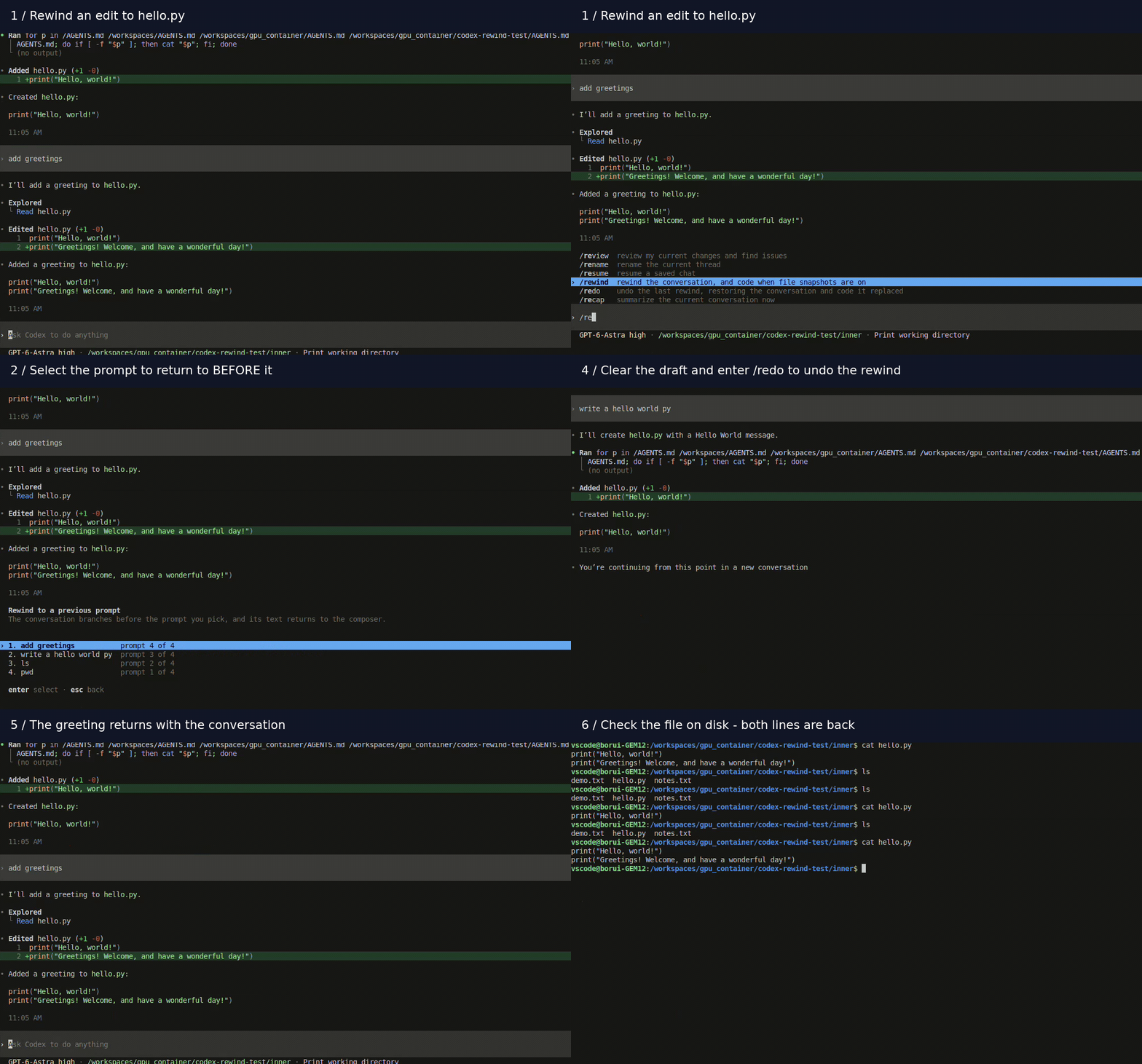
Watch a greeting disappear with /rewind and return with /redo, then follow the
screenshot guide below to try it yourself.
Watch rewind and redoExpand to play · Collapse to hide animation
New to Codex itself? The upstream guide covers authentication and the standard CLI workflow.
Your first rewind
Try this in a scratch directory with snapshots enabled in a new session. Select any screenshot to open it at full size.
-
Make two changes
Ask
write a hello world py. When it finishes, askadd greetings. Yourhello.pynow has two print statements.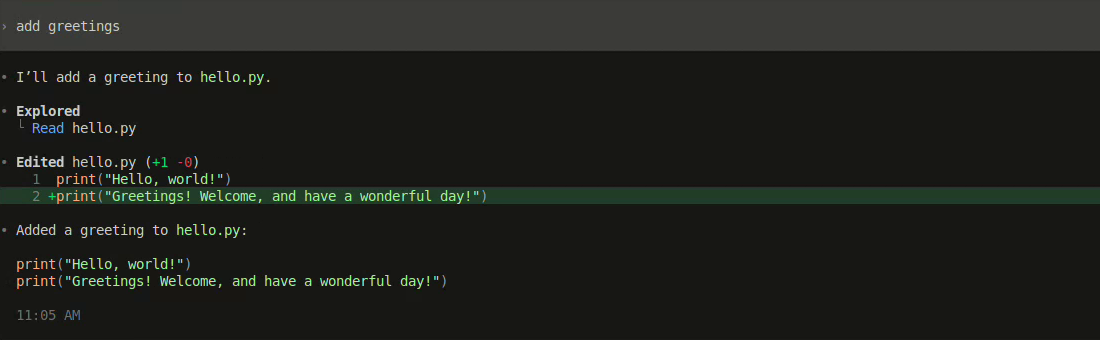
Before rewind: the greeting is the second line in hello.py. -
Pick the prompt to undo
Enter
/rewind, use ↑ / ↓ to select add greetings, and press Enter. The newest prompt is first. Esc closes the picker.
Choose the prompt whose changes you want to undo: add greetings. -
Check your files
Rewind returns to before the selected prompt, undoing that turn and the turns after it. Open
hello.py: only the original hello-world line remains.The selected prompt returns to the composer without being sent. Edit it to try another approach, or clear it.
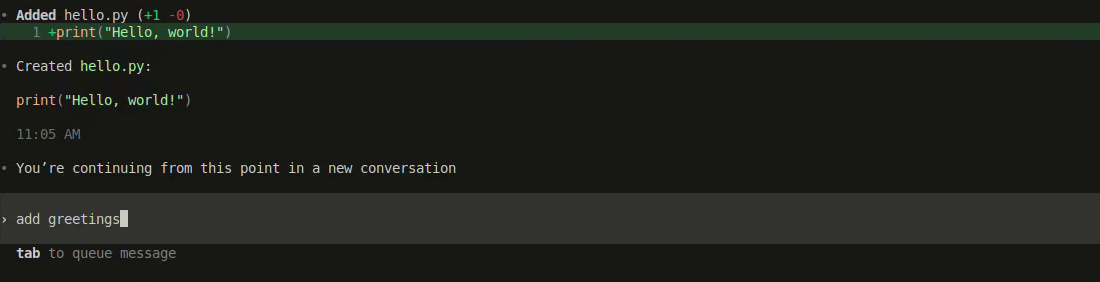
After rewind: the original hello-world line remains, and the prompt is ready to edit. -
Bring the change back
Clear the draft prompt, enter
/redo, and press Enter. The conversation and files return to their state before the rewind.
Verify with cat hello.py: one line after rewind, two lines again after redo.
/redo. The picker warns you before proceeding. If you edit files or continue after a
rewind, review the redo confirmation carefully.
Three commands to know
| Command | What it does |
|---|---|
/rewind |
Choose a prompt and restore the conversation and tracked files to before it. |
/redo |
Undo a rewind. Review any confirmation about files that have changed since. |
/status |
Check snapshot status and disk usage when the feature is enabled. |
What gets tracked
Snapshots combine three sources of files. Shell changes are covered within these bounds; this is not a backup of everything on your machine.
| Source | Coverage |
|---|---|
| Git-tracked files | Read from the index, with no file-count cap. |
| Agent-edited files | Captured by the edit tool, including files outside the working directory. No file-count cap. |
| Recently modified files |
Up to 100 files, 16 MB each. Skips dependency and build directories such as
node_modules, target, and Pods.
|
Hidden files are excluded by default, except when explicitly edited by the agent. Rewind never modifies git metadata.
Exclude files from snapshots
Create a .codexsnapignore in your project using gitignore syntax. It is separate from
.gitignore. Excluded paths are never snapshotted, restored, or deleted by a restore.
private-notes/
*.local.csv
Storage
Snapshots live in ~/.codex/file_snapshots/. Identical file contents are stored once across
turns and sessions. Check usage with /status. Deleting a conversation also deletes its
snapshots; checkpoints are not discarded just to limit the number of turns.
Make it part of your workflow
To enable snapshots for future sessions, turn the feature on in /experimental, or add the key
to your existing configuration. If a [features] table exists, add the key there.
[features]
file_snapshots = true
Keep your Codex installations separate
By default, both distributions share ~/.codex, including login, config, and history. To isolate
Rewind, set CODEX_HOME to another directory. You will need to sign in again.
CODEX_HOME=~/.codex-rewind codexr --enable file_snapshots$env:CODEX_HOME = "$HOME\.codex-rewind"
codexr --enable file_snapshotsLimits & compatibility
codex creates a silent gap: those turns have no snapshots. Sessions started in the official
build have no file snapshots to restore.
- Local environments only. Remote environments are not supported.
- No merging between sessions. Concurrent sessions in one directory can overwrite each other’s files. Use separate worktrees or checkouts.
- Recovery needs a snapshot. Rewind cannot restore content from before it knew a file existed. It only deletes a file when a capture provides evidence that the file was absent.
-
Shared config has a caveat. Official Codex warns about the unknown
file_snapshotsfeature key. With--strict-config, leftover unknown fields can cause an error.
Rewind archives the conversation it replaces. History keeps the upstream format, and archived conversations
can be retrieved with codex unarchive <id>.
Clean uninstall
npm uninstall -g codex-rewind
To remove snapshot data, delete only the file_snapshots directory inside your Codex home
(normally ~/.codex/file_snapshots/). This permanently removes the ability to restore those file
snapshots.
Optionally remove file_snapshots from [features] and any
[file_snapshots] table in config.toml.
~/.codex itself: it contains
your login, configuration, and conversations, shared with official Codex. Uninstalling does not unarchive
conversations that rewind archived.
Contributing & support
Report issues in this project’s repository. Include both versions below: npm identifies the Rewind release,
while codexr --version reports its upstream baseline.
npm ls -g codex-rewind
codexr --version
Contributions should include a sign-off with git commit -s. If a change is later proposed
upstream, its original author must personally sign OpenAI’s CLA.