Where Cursor Stores Chat History: state.vscdb, JSONL, and store.db
Understand where Cursor stores local conversations, how Composer, JSONL and Store sources differ, and what cursor-history can read, export and preserve.

Storage notes checked on September 8, 2026, against cursor-history 0.18.0. These are supported local layouts, not a promise about every Cursor release or cloud history.
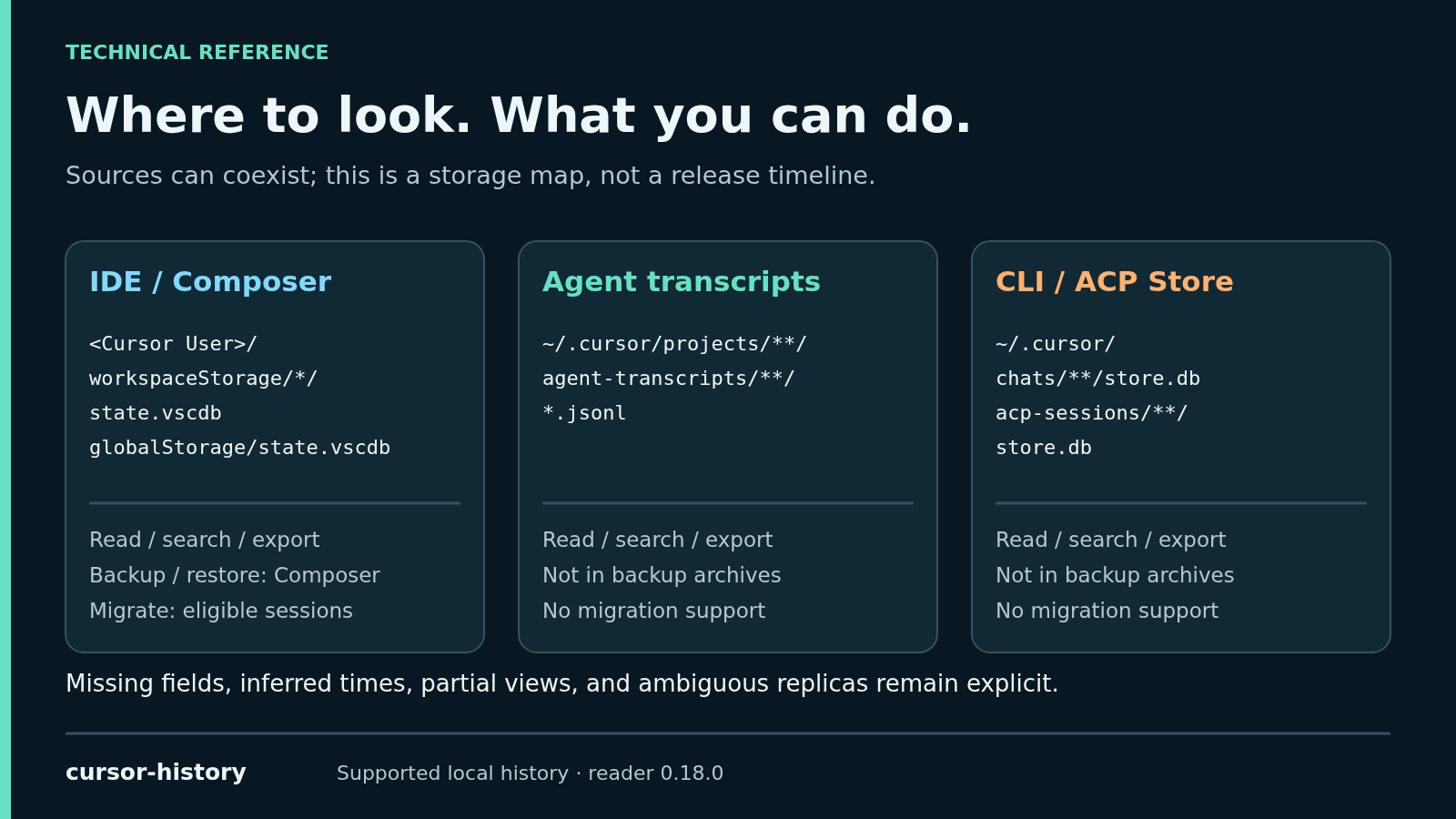
Cursor chat history can live in several places on the same machine. IDE / Composer data uses state.vscdb; Agent transcripts can appear as JSONL files; CLI and ACP sessions can use per-session store.db files. They are different representations with different fields, not interchangeable backups.
If you only want to find an old conversation, start here:
npm install -g cursor-history
cursor-history list --all
cursor-history search "authentication"
No prior recording setup is required. The CLI searches readable, supported history already on disk. The rest of this article explains what it can find—and what a successful read does not prove.
The local storage map
| Family | Observed path | What the reader looks for |
|---|---|---|
| Composer workspace | <Cursor User>/workspaceStorage/*/state.vscdb | Workspace associations and conversation references |
| Composer global | <Cursor User>/globalStorage/state.vscdb | Conversation records and message payloads |
| Agent transcript | ~/.cursor/projects/**/agent-transcripts/**/*.jsonl | User / assistant text and available tool records |
| CLI Store | ~/.cursor/chats/**/store.db | A per-session conversation graph |
| ACP Store | ~/.cursor/acp-sessions/**/store.db | Store data discovered under the ACP root |
The default <Cursor User> directory is ~/Library/Application Support/Cursor/User on macOS, %APPDATA%\Cursor\User on Windows, and ~/.config/Cursor/User on Linux. ~/.cursor is a separate root. Custom installations and WSL may require explicit paths. These defaults and selectors are defined in the project’s platform resolver.
Composer: an index entry is not the conversation
In the Composer family, SQLite is a container for application records. A workspace list and the conversation’s actual messages may be in separate databases.
The reader handles records such as composer.composerData, composerData:<id>, and bubbleId:<composer-id>:<bubble-id>. A header can establish that a conversation existed without providing every message, tool result, or file change. The discovery and read implementation resolves these references rather than treating a list of titles as a complete archive.
To inspect the schema without changing it, close Cursor and use SQLite’s read-only mode. Replace the example path with your actual database path:
sqlite3 -readonly '/absolute/path/to/state.vscdb' "SELECT name FROM sqlite_master WHERE type='table' ORDER BY name;"If that database contains ItemTable, you can inspect relevant key names without dumping conversations:
SELECT key FROM ItemTable
WHERE key IN ('composer.composerData', 'composer.composerHeaders');
An absent key is an observation about that database, not evidence that the conversation was deleted.
What changed around Cursor 3.x?
Callum Ward’s cursaves storage research describes a Cursor 3.0 shift from workspace chat lists to global composer.composerHeaders, with older workspace structures remaining relevant. That is independent reverse engineering, not a public Cursor storage API.
Keep that observation separate from this tool’s guarantees. The reviewed cursor-history reader discovers workspace references and global conversation records; this article does not claim it implements every index-repair or sidebar-restoration workflow described by cursaves.
Transcripts: useful content, sometimes fewer fields
JSONL is straightforward to inspect: each line is a JSON record, and supported messages carry roles and content. The project’s transcript fixtures and parser make this behavior inspectable.
A transcript can preserve the text you need to solve a problem while lacking precise per-message timestamps, model details, or tool results. That does not make it useless. It means a consumer must distinguish two questions:
- Did we successfully read the available source?
- Did Cursor record every field we wish we had?
A transcript can be the complete available primary source when no database is expected. It should not automatically be described as a failed database fallback. Where an expected database cannot provide usable content, a transcript view can instead be explicitly degraded. Stored, inferred, and unknown times must remain distinguishable.
Store: reconstructing a graph instead of selecting message rows
The supported store.db layout uses metadata and blobs. The Store reader follows the active root and reconstructs reachable conversation content. It does not assume that every blob in the database belongs in the current transcript.
That distinction matters when historical or abandoned blobs remain on disk. Combining every object that happens to parse could add unrelated content to a session.
Why IDE and CLI history can disagree
In a Cursor forum discussion, staff described the local IDE and CLI / ACP stores as separate and said they did not yet offer a shared local resume identity. The replies checked for this article date from July and August 2026; future releases may change this.
Cursor’s CLI reference documents agent ls, agent resume, and agent --resume=<id>. Those are useful for continuing CLI work. Reading or exporting a discovered conversation through a third-party tool does not itself make that conversation resumable in a different Cursor surface.
How cursor-history resolves overlapping sources
The 0.18.0 contract makes the rules concrete:
- A usable Store database supplies the Store conversation when it coexists with a transcript inside the permitted scope. The transcript remains provenance; it is not blindly appended.
- Equivalent replicas can reconcile into one logical row. Divergent replicas are reported as ambiguous rather than silently unioned.
- Workspace filters constrain conversation reads. A known contributor outside that boundary can make the returned view explicitly partial.
- Source corruption and missing content are different from a missing SQLite capability. Capability errors can fail the operation rather than masquerade as an empty history.
This is source resolution, not a guarantee that every chat is found or every field recovered.
Read, export, back up, and migrate have different boundaries
| Task | Supported scope in 0.18.0 |
|---|---|
| List / search / show / export | Supported readable Composer, transcript, and Store sources; partial views remain possible |
| Backup / restore | Composer databases only |
| Migrate between workspaces | Eligible Composer sessions; Store-only, merged-source, and ambiguous sessions are refused |
An export saves the readable representation. A backup is a supported Composer archive. Neither should be presented as a universal cross-surface resume bridge.
To inspect a result, use its returned session index within the same scope, or preserve the exact UUID:
cursor-history show 1
cursor-history export 1
1 is illustrative; it is not necessarily the first search hit. Search order and session list indices are different concepts.
What to try next
Search for a distinctive error, symbol, or command from a previous debugging session. The search is case-insensitive text matching, with no embeddings or API key; it runs against the selected local roots, not every remote machine you have used.
Install cursor-history · Read the source or star the repository
Continue with the search workflow, moved-project recovery, or history access through MCP.